

Thruxion - Humans API
API URL: https://thruxion.com/api/humans/
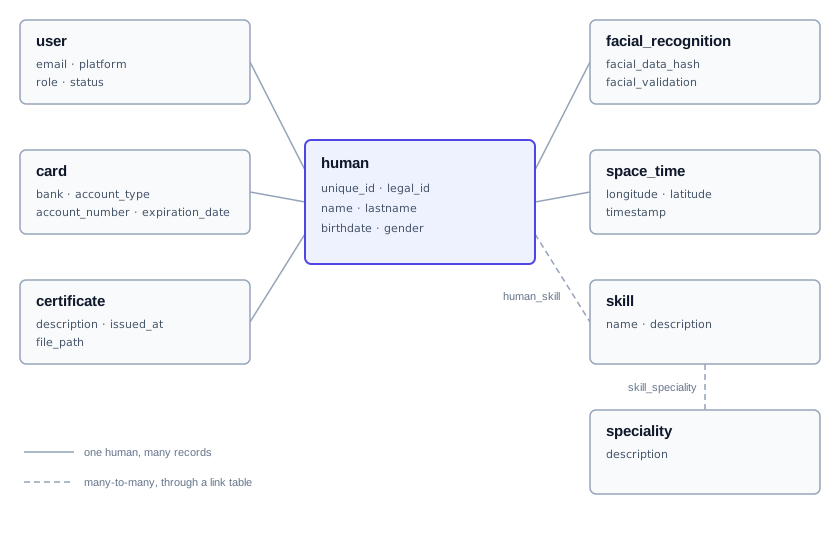
The Humans API keeps a registry of people (humans) and what is known about them: their user accounts on different platforms, their skills and specialities, certificates, facial recognition records, bank cards and space-time records (where they were, and when). A human is the central record and everything else belongs to one.
The documentation has code examples in Shell, Ruby, Python and JavaScript. The JavaScript examples run on Node.js with the axios package, plus form-data for file uploads.
Conventions used by every endpoint:
- Requests and responses are JSON. File uploads use
multipart/form-data. - Every endpoint except System Login and Health Check needs a token in the
Authorizationheader, asBearer <token>. - IDs are integers.
- Send dates as
YYYY-MM-DDand date-times asYYYY-MM-DD HH:MM:SS. Responses return them in ISO 8601 format (UTC), for example2026-01-13T00:40:56.000Z.
Authentication
The API uses JSON Web Tokens (JWT). Log in with a system account to get a token, then include it in the Authorization header of every other request:
Authorization: Bearer <token>
There are two system accounts, admin and dev, and their credentials are provided by Thruxion. They are different from the users stored by the API, who are the end users of your platforms.
A request with a missing or rejected token gets one of these errors:
| Status | Body | Reason |
|---|---|---|
| 401 | {"error": "Access denied"} |
No Authorization header. |
| 401 | {"error": "Invalid Authorization format"} |
The header is not Bearer <token>. |
| 403 | {"error": "Invalid token"} |
The token is invalid, expired or from the wrong account. |
System Login
require 'net/http'
require 'json'

uri = URI('https://thruxion.com/api/humans/auth/system-login')
req = Net::HTTP::Post.new(uri, 'Content-Type' => 'application/json')
req.body = {
  username: 'admin',
  password: 'yourpassword'
}.to_json

res = Net::HTTP.start(uri.hostname, uri.port, use_ssl: true) { |http| http.request(req) }
puts res.body
import requests

url = "https://thruxion.com/api/humans/auth/system-login"
data = {
    "username": "admin",
    "password": "yourpassword"
}

response = requests.post(url, json=data)
print(response.json())
curl -X POST "https://thruxion.com/api/humans/auth/system-login" \
  -H "Content-Type: application/json" \
  -d '{
    "username": "admin",
    "password": "yourpassword"
  }'
const axios = require('axios');

const login = async () => {
    const data = {
        username: 'admin',
        password: 'yourpassword'
    };
    try {
        const response = await axios.post('https://thruxion.com/api/humans/auth/system-login', data);
        console.log(response.data);
    } catch (error) {
        console.error(error.response ? error.response.data : error.message);
    }
};

login();
The above command returns JSON structured like this:
{
    "token": "eyJhbGciOiJIUzI1NiIsInR5cCI6IkpXVCJ9...",
    "role": "admin"
}
This endpoint logs in with a system account and returns a token. role says which account the token belongs to: admin or dev.
HTTP Request
POST https://thruxion.com/api/humans/auth/system-login
Parameters
| Parameter | In | Type | Required | Description |
|---|---|---|---|---|
| username | body | string | Yes | The system account's username. |
| password | body | string | Yes | The system account's password. |
Wrong credentials get 401 with {"error": "Invalid credentials"}.
Humans
A human is the central record of the API. Users, certificates, facial recognition records, cards, space-time records and skill links all belong to a human.
Create Human
require 'net/http'
require 'json'

uri = URI('https://thruxion.com/api/humans/human')
req = Net::HTTP::Post.new(uri, 'Content-Type' => 'application/json', 'Authorization' => 'Bearer YOUR_JWT_TOKEN')
req.body = {
  unique_id: 'HUM-000123',
  legal_id: '12345678-9',
  name: 'Ana',
  lastname: 'Rojas',
  birthdate: '1990-05-14',
  gender: 'female'
}.to_json

res = Net::HTTP.start(uri.hostname, uri.port, use_ssl: true) { |http| http.request(req) }
puts res.body
import requests

url = "https://thruxion.com/api/humans/human"
headers = {"Authorization": "Bearer YOUR_JWT_TOKEN"}
data = {
    "unique_id": "HUM-000123",
    "legal_id": "12345678-9",
    "name": "Ana",
    "lastname": "Rojas",
    "birthdate": "1990-05-14",
    "gender": "female"
}

response = requests.post(url, headers=headers, json=data)
print(response.json())
curl -X POST "https://thruxion.com/api/humans/human" \
  -H "Authorization: Bearer YOUR_JWT_TOKEN" \
  -H "Content-Type: application/json" \
  -d '{
    "unique_id": "HUM-000123",
    "legal_id": "12345678-9",
    "name": "Ana",
    "lastname": "Rojas",
    "birthdate": "1990-05-14",
    "gender": "female"
  }'
const axios = require('axios');

const createHuman = async (token) => {
    const data = {
        unique_id: 'HUM-000123',
        legal_id: '12345678-9',
        name: 'Ana',
        lastname: 'Rojas',
        birthdate: '1990-05-14',
        gender: 'female'
    };
    try {
        const response = await axios.post('https://thruxion.com/api/humans/human', data, {
            headers: { Authorization: `Bearer ${token}` }
        });
        console.log(response.data);
    } catch (error) {
        console.error(error.response ? error.response.data : error.message);
    }
};

createHuman('YOUR_JWT_TOKEN');
The above command returns JSON structured like this:
{
    "success": true,
    "message": "Human created",
    "id": 1
}
This endpoint creates a human. It answers 201 Created with the new human's ID.
HTTP Request
POST https://thruxion.com/api/humans/human
Parameters
| Parameter | In | Type | Required | Description |
|---|---|---|---|---|
| unique_id | body | string | No | Your own identifier for the human. Must be unique. |
| legal_id | body | string | No | National ID or another legal identifier. |
| name | body | string | Yes | First name, up to 100 characters. |
| lastname | body | string | Yes | Last name, up to 100 characters. |
| birthdate | body | date | Yes | Date of birth, YYYY-MM-DD. |
| gender | body | string | Yes | Up to 50 characters. |
List Humans
require 'net/http'
require 'json'

uri = URI('https://thruxion.com/api/humans/human')
uri.query = URI.encode_www_form(page: 1, limit: 20)
req = Net::HTTP::Get.new(uri, 'Authorization' => 'Bearer YOUR_JWT_TOKEN')

res = Net::HTTP.start(uri.hostname, uri.port, use_ssl: true) { |http| http.request(req) }
puts res.body
import requests

url = "https://thruxion.com/api/humans/human"
headers = {"Authorization": "Bearer YOUR_JWT_TOKEN"}
params = {
    "page": 1,
    "limit": 20
}

response = requests.get(url, headers=headers, params=params)
print(response.json())
curl "https://thruxion.com/api/humans/human?page=1&limit=20" \
  -H "Authorization: Bearer YOUR_JWT_TOKEN"
const axios = require('axios');

const listHumans = async (token) => {
    try {
        const response = await axios.get('https://thruxion.com/api/humans/human', {
            headers: { Authorization: `Bearer ${token}` },
            params: { page: 1, limit: 20 }
        });
        console.log(response.data);
    } catch (error) {
        console.error(error.response ? error.response.data : error.message);
    }
};

listHumans('YOUR_JWT_TOKEN');
The above command returns JSON structured like this:
{
    "success": true,
    "page": 1,
    "limit": 20,
    "count": 1,
    "data": [
        {
            "id": 1,
            "unique_id": "HUM-000123",
            "legal_id": "12345678-9",
            "name": "Ana",
            "lastname": "Rojas",
            "birthdate": "1990-05-14T00:00:00.000Z",
            "gender": "female",
            "created_at": "2026-01-13T00:40:56.000Z",
            "updated_at": "2026-01-13T00:40:56.000Z"
        }
    ]
}
This endpoint lists humans, newest first, one page at a time. count is the number of humans on this page.
HTTP Request
GET https://thruxion.com/api/humans/human
Parameters
| Parameter | In | Type | Required | Description |
|---|---|---|---|---|
| page | query | integer | No | Page number, starting at 1. Default: 1. |
| limit | query | integer | No | Humans per page, from 1 to 100. Default: 50. |
Get Human
require 'net/http'
require 'json'

human_id = 1  # Replace 1 with the human ID
uri = URI("https://thruxion.com/api/humans/human/#{human_id}")
req = Net::HTTP::Get.new(uri, 'Authorization' => 'Bearer YOUR_JWT_TOKEN')

res = Net::HTTP.start(uri.hostname, uri.port, use_ssl: true) { |http| http.request(req) }
puts res.body
import requests

human_id = 1  # Replace 1 with the human ID
url = f"https://thruxion.com/api/humans/human/{human_id}"
headers = {"Authorization": "Bearer YOUR_JWT_TOKEN"}

response = requests.get(url, headers=headers)
print(response.json())
curl "https://thruxion.com/api/humans/human/1" \
  -H "Authorization: Bearer YOUR_JWT_TOKEN"
const axios = require('axios');

const getHuman = async (id, token) => {
    try {
        const response = await axios.get(`https://thruxion.com/api/humans/human/${id}`, {
            headers: { Authorization: `Bearer ${token}` }
        });
        console.log(response.data);
    } catch (error) {
        console.error(error.response ? error.response.data : error.message);
    }
};

// Replace 1 with the human ID
getHuman(1, 'YOUR_JWT_TOKEN');
The above command returns JSON structured like this:
{
    "success": true,
    "data": {
        "id": 1,
        "unique_id": "HUM-000123",
        "legal_id": "12345678-9",
        "name": "Ana",
        "lastname": "Rojas",
        "birthdate": "1990-05-14T00:00:00.000Z",
        "gender": "female",
        "created_at": "2026-01-13T00:40:56.000Z",
        "updated_at": "2026-01-13T00:40:56.000Z",
        "users": [
            {
                "id": 1,
                "email": "ana@example.com",
                "role": "user",
                "status": "active",
                "platform": "android",
                "last_login": "2026-01-14T09:12:03.000Z",
                "created_at": "2026-01-13T00:40:56.000Z"
            }
        ],
        "skills": [
            {
                "id": 3,
                "name": "Welding",
                "description": "MIG and TIG welding"
            }
        ],
        "certificates": [
            {
                "id": 1,
                "description": "Welding certificate",
                "file_path": "uploads/files/file-1736726456123-482910345.pdf",
                "issued_at": "2025-11-20T00:00:00.000Z",
                "created_at": "2026-01-13T00:40:56.000Z"
            }
        ],
        "facial_recognitions": [
            {
                "id": 1,
                "facial_data_hash": "9f86d081884c7d659a2feaa0c55ad015a3bf4f1b2b0b822cd15d6c15b0f00a08",
                "facial_validation": 0,
                "created_at": "2026-01-13T00:40:56.000Z"
            }
        ],
        "cards": [
            {
                "id": 1,
                "bank": "Example Bank",
                "account_type": "checking",
                "expiration_date": "2029-08-31T00:00:00.000Z",
                "created_at": "2026-01-13T00:40:56.000Z"
            }
        ],
        "space_time": [
            {
                "id": 1,
                "longitude": "-70.6483",
                "latitude": "-33.4569",
                "timestamp": "2026-01-13T12:00:00.000Z"
            }
        ]
    }
}
This endpoint retrieves one human together with everything that belongs to them: users, skills, certificates, facial recognition records, cards (without account numbers) and the 50 most recent space-time records.
HTTP Request
GET https://thruxion.com/api/humans/human/<ID>
Parameters
| Parameter | In | Type | Required | Description |
|---|---|---|---|---|
| ID | path | integer | Yes | The human ID |
If no human has that ID, the answer is 404 with {"success": false, "message": "Human not found"}.
Update Human
require 'net/http'
require 'json'

human_id = 1  # Replace 1 with the human ID
uri = URI("https://thruxion.com/api/humans/human/#{human_id}")
req = Net::HTTP::Put.new(uri, 'Content-Type' => 'application/json', 'Authorization' => 'Bearer YOUR_JWT_TOKEN')
req.body = {
  lastname: 'Rojas Soto',
  gender: 'female'
}.to_json

res = Net::HTTP.start(uri.hostname, uri.port, use_ssl: true) { |http| http.request(req) }
puts res.body
import requests

human_id = 1  # Replace 1 with the human ID
url = f"https://thruxion.com/api/humans/human/{human_id}"
headers = {"Authorization": "Bearer YOUR_JWT_TOKEN"}
data = {
    "lastname": "Rojas Soto",
    "gender": "female"
}

response = requests.put(url, headers=headers, json=data)
print(response.json())
curl -X PUT "https://thruxion.com/api/humans/human/1" \
  -H "Authorization: Bearer YOUR_JWT_TOKEN" \
  -H "Content-Type: application/json" \
  -d '{
    "lastname": "Rojas Soto",
    "gender": "female"
  }'
const axios = require('axios');

const updateHuman = async (id, token) => {
    const data = {
        lastname: 'Rojas Soto',
        gender: 'female'
    };
    try {
        const response = await axios.put(`https://thruxion.com/api/humans/human/${id}`, data, {
            headers: { Authorization: `Bearer ${token}` }
        });
        console.log(response.data);
    } catch (error) {
        console.error(error.response ? error.response.data : error.message);
    }
};

// Replace 1 with the human ID
updateHuman(1, 'YOUR_JWT_TOKEN');
The above command returns JSON structured like this:
{
    "success": true,
    "message": "Human updated"
}
This endpoint updates a human. Send only the fields you want to change; the others keep their values. A request with no fields is refused with 400.
HTTP Request
PUT https://thruxion.com/api/humans/human/<ID>
Parameters
| Parameter | In | Type | Required | Description |
|---|---|---|---|---|
| ID | path | integer | Yes | The human ID |
| unique_id | body | string | No | Your own identifier for the human. Must be unique. |
| legal_id | body | string | No | National ID or another legal identifier. |
| name | body | string | No | First name. |
| lastname | body | string | No | Last name. |
| birthdate | body | date | No | Date of birth, YYYY-MM-DD. |
| gender | body | string | No | Gender. |
Delete Human
require 'net/http'
require 'json'

human_id = 1  # Replace 1 with the human ID
uri = URI("https://thruxion.com/api/humans/human/#{human_id}")
req = Net::HTTP::Delete.new(uri, 'Authorization' => 'Bearer YOUR_JWT_TOKEN')

res = Net::HTTP.start(uri.hostname, uri.port, use_ssl: true) { |http| http.request(req) }
puts res.body
import requests

human_id = 1  # Replace 1 with the human ID
url = f"https://thruxion.com/api/humans/human/{human_id}"
headers = {"Authorization": "Bearer YOUR_JWT_TOKEN"}

response = requests.delete(url, headers=headers)
print(response.json())
curl -X DELETE "https://thruxion.com/api/humans/human/1" \
  -H "Authorization: Bearer YOUR_JWT_TOKEN"
const axios = require('axios');

const deleteHuman = async (id, token) => {
    try {
        const response = await axios.delete(`https://thruxion.com/api/humans/human/${id}`, {
            headers: { Authorization: `Bearer ${token}` }
        });
        console.log(response.data);
    } catch (error) {
        console.error(error.response ? error.response.data : error.message);
    }
};

// Replace 1 with the human ID
deleteHuman(1, 'YOUR_JWT_TOKEN');
The above command returns JSON structured like this:
{
    "success": true,
    "message": "Human deleted"
}
This endpoint deletes a human, together with their users, certificates, facial recognition records, cards, space-time records and skill links.
HTTP Request
DELETE https://thruxion.com/api/humans/human/<ID>
Parameters
| Parameter | In | Type | Required | Description |
|---|---|---|---|---|
| ID | path | integer | Yes | The human ID |
Users
A user is an account that a human has on one of your platforms, such as a mobile app or a website. The same email can be registered once per platform.
Register User
require 'net/http'
require 'json'

uri = URI('https://thruxion.com/api/humans/user/register')
req = Net::HTTP::Post.new(uri, 'Content-Type' => 'application/json', 'Authorization' => 'Bearer YOUR_JWT_TOKEN')
req.body = {
  human_id: 1,
  email: 'ana@example.com',
  password: 'a-strong-password',
  platform: 'android'
}.to_json

res = Net::HTTP.start(uri.hostname, uri.port, use_ssl: true) { |http| http.request(req) }
puts res.body
import requests

url = "https://thruxion.com/api/humans/user/register"
headers = {"Authorization": "Bearer YOUR_JWT_TOKEN"}
data = {
    "human_id": 1,
    "email": "ana@example.com",
    "password": "a-strong-password",
    "platform": "android"
}

response = requests.post(url, headers=headers, json=data)
print(response.json())
curl -X POST "https://thruxion.com/api/humans/user/register" \
  -H "Authorization: Bearer YOUR_JWT_TOKEN" \
  -H "Content-Type: application/json" \
  -d '{
    "human_id": 1,
    "email": "ana@example.com",
    "password": "a-strong-password",
    "platform": "android"
  }'
const axios = require('axios');

const registerUser = async (token) => {
    const data = {
        human_id: 1,
        email: 'ana@example.com',
        password: 'a-strong-password',
        platform: 'android'
    };
    try {
        const response = await axios.post('https://thruxion.com/api/humans/user/register', data, {
            headers: { Authorization: `Bearer ${token}` }
        });
        console.log(response.data);
    } catch (error) {
        console.error(error.response ? error.response.data : error.message);
    }
};

registerUser('YOUR_JWT_TOKEN');
The above command returns JSON structured like this:
{
    "message": "User created",
    "user_id": 1,
    "platform": "android"
}
This endpoint creates a user for an existing human. It answers 201 Created.
HTTP Request
POST https://thruxion.com/api/humans/user/register
Parameters
| Parameter | In | Type | Required | Description |
|---|---|---|---|---|
| human_id | body | integer | Yes | The human this account belongs to. |
| body | string | Yes | A valid email address. It is stored in lowercase. | |
| password | body | string | Yes | At least 6 characters. It is stored as a bcrypt hash. |
| platform | body | string | No | The platform the account is for, for example android or web. |
| Status | Reason |
|---|---|
| 404 | {"error": "Human not found"} |
| 409 | {"error": "Email and platform combination already registered"} |
Validate User Login
require 'net/http'
require 'json'

uri = URI('https://thruxion.com/api/humans/user/login')
req = Net::HTTP::Post.new(uri, 'Content-Type' => 'application/json', 'Authorization' => 'Bearer YOUR_JWT_TOKEN')
req.body = {
  email: 'ana@example.com',
  password: 'a-strong-password',
  platform: 'android'
}.to_json

res = Net::HTTP.start(uri.hostname, uri.port, use_ssl: true) { |http| http.request(req) }
puts res.body
import requests

url = "https://thruxion.com/api/humans/user/login"
headers = {"Authorization": "Bearer YOUR_JWT_TOKEN"}
data = {
    "email": "ana@example.com",
    "password": "a-strong-password",
    "platform": "android"
}

response = requests.post(url, headers=headers, json=data)
print(response.json())
curl -X POST "https://thruxion.com/api/humans/user/login" \
  -H "Authorization: Bearer YOUR_JWT_TOKEN" \
  -H "Content-Type: application/json" \
  -d '{
    "email": "ana@example.com",
    "password": "a-strong-password",
    "platform": "android"
  }'
const axios = require('axios');

const validateLogin = async (token) => {
    const data = {
        email: 'ana@example.com',
        password: 'a-strong-password',
        platform: 'android'
    };
    try {
        const response = await axios.post('https://thruxion.com/api/humans/user/login', data, {
            headers: { Authorization: `Bearer ${token}` }
        });
        console.log(response.data);
    } catch (error) {
        console.error(error.response ? error.response.data : error.message);
    }
};

validateLogin('YOUR_JWT_TOKEN');
The above command returns JSON structured like this:
{
    "success": true,
    "message": "Login successful",
    "user": {
        "id": 1,
        "human_id": 1,
        "email": "ana@example.com",
        "role": "user",
        "platform": "android"
    }
}
This endpoint checks a user's email and password and returns their profile. Send the same platform the user registered with (or leave it out if they registered without one).
HTTP Request
POST https://thruxion.com/api/humans/user/login
Parameters
| Parameter | In | Type | Required | Description |
|---|---|---|---|---|
| body | string | Yes | The user's email. | |
| password | body | string | Yes | The user's password. |
| platform | body | string | No | The platform the user registered with. |
| Status | Reason |
|---|---|
| 401 | {"success": false, "message": "Invalid credentials"} |
| 403 | {"success": false, "message": "Account inactive"} |
| 429 | {"error": "Too many login attempts. Try again later."}: more than 20 attempts in 15 minutes. |
Change User Password
require 'net/http'
require 'json'

user_id = 1  # Replace 1 with the user ID
uri = URI("https://thruxion.com/api/humans/user/#{user_id}/change-password")
req = Net::HTTP::Post.new(uri, 'Content-Type' => 'application/json', 'Authorization' => 'Bearer YOUR_JWT_TOKEN')
req.body = {
  current_password: 'a-strong-password',
  new_password: 'an-even-stronger-password'
}.to_json

res = Net::HTTP.start(uri.hostname, uri.port, use_ssl: true) { |http| http.request(req) }
puts res.body
import requests

user_id = 1  # Replace 1 with the user ID
url = f"https://thruxion.com/api/humans/user/{user_id}/change-password"
headers = {"Authorization": "Bearer YOUR_JWT_TOKEN"}
data = {
    "current_password": "a-strong-password",
    "new_password": "an-even-stronger-password"
}

response = requests.post(url, headers=headers, json=data)
print(response.json())
curl -X POST "https://thruxion.com/api/humans/user/1/change-password" \
  -H "Authorization: Bearer YOUR_JWT_TOKEN" \
  -H "Content-Type: application/json" \
  -d '{
    "current_password": "a-strong-password",
    "new_password": "an-even-stronger-password"
  }'
const axios = require('axios');

const changePassword = async (id, token) => {
    const data = {
        current_password: 'a-strong-password',
        new_password: 'an-even-stronger-password'
    };
    try {
        const response = await axios.post(`https://thruxion.com/api/humans/user/${id}/change-password`, data, {
            headers: { Authorization: `Bearer ${token}` }
        });
        console.log(response.data);
    } catch (error) {
        console.error(error.response ? error.response.data : error.message);
    }
};

// Replace 1 with the user ID
changePassword(1, 'YOUR_JWT_TOKEN');
The above command returns JSON structured like this:
{
    "message": "Password updated"
}
This endpoint changes a user's password. The current password must be correct.
HTTP Request
POST https://thruxion.com/api/humans/user/<ID>/change-password
Parameters
| Parameter | In | Type | Required | Description |
|---|---|---|---|---|
| ID | path | integer | Yes | The user ID |
| current_password | body | string | Yes | The user's current password. |
| new_password | body | string | Yes | The new password, at least 6 characters. |
| Status | Reason |
|---|---|
| 401 | {"error": "Current password incorrect"} |
| 404 | {"error": "User not found"} |
Get Current User
require 'net/http'
require 'json'

uri = URI('https://thruxion.com/api/humans/user/me')
req = Net::HTTP::Get.new(uri, 'Authorization' => 'Bearer YOUR_USER_TOKEN')

res = Net::HTTP.start(uri.hostname, uri.port, use_ssl: true) { |http| http.request(req) }
puts res.body
import requests

url = "https://thruxion.com/api/humans/user/me"
headers = {"Authorization": "Bearer YOUR_USER_TOKEN"}

response = requests.get(url, headers=headers)
print(response.json())
curl "https://thruxion.com/api/humans/user/me" \
  -H "Authorization: Bearer YOUR_USER_TOKEN"
const axios = require('axios');

const getCurrentUser = async (token) => {
    try {
        const response = await axios.get('https://thruxion.com/api/humans/user/me', {
            headers: { Authorization: `Bearer ${token}` }
        });
        console.log(response.data);
    } catch (error) {
        console.error(error.response ? error.response.data : error.message);
    }
};

getCurrentUser('YOUR_USER_TOKEN');
The above command returns JSON structured like this:
{
    "id": 1,
    "email": "ana@example.com",
    "role": "user",
    "status": "active",
    "platform": "android",
    "created_at": "2026-01-13T00:40:56.000Z",
    "human_id": 1,
    "name": "Ana",
    "lastname": "Rojas"
}
This endpoint returns the logged-in user's account and the name of their human. It needs a token issued to the user, not a system token; any other token is refused with 403.
HTTP Request
GET https://thruxion.com/api/humans/user/me
Disable User
require 'net/http'
require 'json'

user_id = 1  # Replace 1 with the user ID
uri = URI("https://thruxion.com/api/humans/user/#{user_id}/disable")
req = Net::HTTP::Post.new(uri, 'Authorization' => 'Bearer YOUR_JWT_TOKEN')

res = Net::HTTP.start(uri.hostname, uri.port, use_ssl: true) { |http| http.request(req) }
puts res.body
import requests

user_id = 1  # Replace 1 with the user ID
url = f"https://thruxion.com/api/humans/user/{user_id}/disable"
headers = {"Authorization": "Bearer YOUR_JWT_TOKEN"}

response = requests.post(url, headers=headers)
print(response.json())
curl -X POST "https://thruxion.com/api/humans/user/1/disable" \
  -H "Authorization: Bearer YOUR_JWT_TOKEN"
const axios = require('axios');

const disableUser = async (id, token) => {
    try {
        const response = await axios.post(`https://thruxion.com/api/humans/user/${id}/disable`, null, {
            headers: { Authorization: `Bearer ${token}` }
        });
        console.log(response.data);
    } catch (error) {
        console.error(error.response ? error.response.data : error.message);
    }
};

// Replace 1 with the user ID
disableUser(1, 'YOUR_JWT_TOKEN');
The above command returns JSON structured like this:
{
    "message": "User disabled"
}
This endpoint disables a user. A disabled user can no longer log in: Validate User Login answers 403 Account inactive. The request has no body.
HTTP Request
POST https://thruxion.com/api/humans/user/<ID>/disable
Parameters
| Parameter | In | Type | Required | Description |
|---|---|---|---|---|
| ID | path | integer | Yes | The user ID |
If no user has that ID, the answer is 404 with {"error": "User not found"}.
Get User's Human
require 'net/http'
require 'json'

user_id = 1  # Replace 1 with the user ID
uri = URI("https://thruxion.com/api/humans/user/#{user_id}/human")
req = Net::HTTP::Get.new(uri, 'Authorization' => 'Bearer YOUR_JWT_TOKEN')

res = Net::HTTP.start(uri.hostname, uri.port, use_ssl: true) { |http| http.request(req) }
puts res.body
import requests

user_id = 1  # Replace 1 with the user ID
url = f"https://thruxion.com/api/humans/user/{user_id}/human"
headers = {"Authorization": "Bearer YOUR_JWT_TOKEN"}

response = requests.get(url, headers=headers)
print(response.json())
curl "https://thruxion.com/api/humans/user/1/human" \
  -H "Authorization: Bearer YOUR_JWT_TOKEN"
const axios = require('axios');

const getUserHuman = async (id, token) => {
    try {
        const response = await axios.get(`https://thruxion.com/api/humans/user/${id}/human`, {
            headers: { Authorization: `Bearer ${token}` }
        });
        console.log(response.data);
    } catch (error) {
        console.error(error.response ? error.response.data : error.message);
    }
};

// Replace 1 with the user ID
getUserHuman(1, 'YOUR_JWT_TOKEN');
The above command returns JSON structured like this:
{
    "id": 1,
    "unique_id": "HUM-000123",
    "legal_id": "12345678-9",
    "name": "Ana",
    "lastname": "Rojas",
    "birthdate": "1990-05-14T00:00:00.000Z",
    "gender": "female"
}
This endpoint returns the human that a user belongs to.
HTTP Request
GET https://thruxion.com/api/humans/user/<ID>/human
Parameters
| Parameter | In | Type | Required | Description |
|---|---|---|---|---|
| ID | path | integer | Yes | The user ID |
If the user or the human does not exist, the answer is 404 with {"error": "User or human not found"}.
Skills
Skills are things a human can do. Link them to humans and to specialities with the Relationships endpoints.
Create Skill
require 'net/http'
require 'json'

uri = URI('https://thruxion.com/api/humans/skill')
req = Net::HTTP::Post.new(uri, 'Content-Type' => 'application/json', 'Authorization' => 'Bearer YOUR_JWT_TOKEN')
req.body = {
  name: 'Welding',
  description: 'MIG and TIG welding'
}.to_json

res = Net::HTTP.start(uri.hostname, uri.port, use_ssl: true) { |http| http.request(req) }
puts res.body
import requests

url = "https://thruxion.com/api/humans/skill"
headers = {"Authorization": "Bearer YOUR_JWT_TOKEN"}
data = {
    "name": "Welding",
    "description": "MIG and TIG welding"
}

response = requests.post(url, headers=headers, json=data)
print(response.json())
curl -X POST "https://thruxion.com/api/humans/skill" \
  -H "Authorization: Bearer YOUR_JWT_TOKEN" \
  -H "Content-Type: application/json" \
  -d '{
    "name": "Welding",
    "description": "MIG and TIG welding"
  }'
const axios = require('axios');

const createSkill = async (token) => {
    const data = {
        name: 'Welding',
        description: 'MIG and TIG welding'
    };
    try {
        const response = await axios.post('https://thruxion.com/api/humans/skill', data, {
            headers: { Authorization: `Bearer ${token}` }
        });
        console.log(response.data);
    } catch (error) {
        console.error(error.response ? error.response.data : error.message);
    }
};

createSkill('YOUR_JWT_TOKEN');
The above command returns JSON structured like this:
{
    "id": 3
}
This endpoint creates a skill and returns its ID.
HTTP Request
POST https://thruxion.com/api/humans/skill
Parameters
| Parameter | In | Type | Required | Description |
|---|---|---|---|---|
| name | body | string | Yes | Name of the skill, up to 100 characters. |
| description | body | string | No | Up to 255 characters. |
List Skills
require 'net/http'
require 'json'

uri = URI('https://thruxion.com/api/humans/skill')
req = Net::HTTP::Get.new(uri, 'Authorization' => 'Bearer YOUR_JWT_TOKEN')

res = Net::HTTP.start(uri.hostname, uri.port, use_ssl: true) { |http| http.request(req) }
puts res.body
import requests

url = "https://thruxion.com/api/humans/skill"
headers = {"Authorization": "Bearer YOUR_JWT_TOKEN"}

response = requests.get(url, headers=headers)
print(response.json())
curl "https://thruxion.com/api/humans/skill" \
  -H "Authorization: Bearer YOUR_JWT_TOKEN"
const axios = require('axios');

const listSkills = async (token) => {
    try {
        const response = await axios.get('https://thruxion.com/api/humans/skill', {
            headers: { Authorization: `Bearer ${token}` }
        });
        console.log(response.data);
    } catch (error) {
        console.error(error.response ? error.response.data : error.message);
    }
};

listSkills('YOUR_JWT_TOKEN');
The above command returns JSON structured like this:
[
    {
        "id": 3,
        "name": "Welding",
        "description": "MIG and TIG welding",
        "created_at": "2026-01-13T00:40:56.000Z"
    }
]
This endpoint lists every skill.
HTTP Request
GET https://thruxion.com/api/humans/skill
Get Skill
require 'net/http'
require 'json'

skill_id = 3  # Replace 3 with the skill ID
uri = URI("https://thruxion.com/api/humans/skill/#{skill_id}")
req = Net::HTTP::Get.new(uri, 'Authorization' => 'Bearer YOUR_JWT_TOKEN')

res = Net::HTTP.start(uri.hostname, uri.port, use_ssl: true) { |http| http.request(req) }
puts res.body
import requests

skill_id = 3  # Replace 3 with the skill ID
url = f"https://thruxion.com/api/humans/skill/{skill_id}"
headers = {"Authorization": "Bearer YOUR_JWT_TOKEN"}

response = requests.get(url, headers=headers)
print(response.json())
curl "https://thruxion.com/api/humans/skill/3" \
  -H "Authorization: Bearer YOUR_JWT_TOKEN"
const axios = require('axios');

const getSkill = async (id, token) => {
    try {
        const response = await axios.get(`https://thruxion.com/api/humans/skill/${id}`, {
            headers: { Authorization: `Bearer ${token}` }
        });
        console.log(response.data);
    } catch (error) {
        console.error(error.response ? error.response.data : error.message);
    }
};

// Replace 3 with the skill ID
getSkill(3, 'YOUR_JWT_TOKEN');
The above command returns JSON structured like this:
{
    "id": 3,
    "name": "Welding",
    "description": "MIG and TIG welding",
    "created_at": "2026-01-13T00:40:56.000Z"
}
This endpoint retrieves one skill.
HTTP Request
GET https://thruxion.com/api/humans/skill/<ID>
Parameters
| Parameter | In | Type | Required | Description |
|---|---|---|---|---|
| ID | path | integer | Yes | The skill ID |
If no skill has that ID, the answer is 404 with {"message": "Not found"}.
Update Skill
require 'net/http'
require 'json'

skill_id = 3  # Replace 3 with the skill ID
uri = URI("https://thruxion.com/api/humans/skill/#{skill_id}")
req = Net::HTTP::Put.new(uri, 'Content-Type' => 'application/json', 'Authorization' => 'Bearer YOUR_JWT_TOKEN')
req.body = {
  description: 'MIG, TIG and stick welding'
}.to_json

res = Net::HTTP.start(uri.hostname, uri.port, use_ssl: true) { |http| http.request(req) }
puts res.body
import requests

skill_id = 3  # Replace 3 with the skill ID
url = f"https://thruxion.com/api/humans/skill/{skill_id}"
headers = {"Authorization": "Bearer YOUR_JWT_TOKEN"}
data = {
    "description": "MIG, TIG and stick welding"
}

response = requests.put(url, headers=headers, json=data)
print(response.json())
curl -X PUT "https://thruxion.com/api/humans/skill/3" \
  -H "Authorization: Bearer YOUR_JWT_TOKEN" \
  -H "Content-Type: application/json" \
  -d '{
    "description": "MIG, TIG and stick welding"
  }'
const axios = require('axios');

const updateSkill = async (id, token) => {
    const data = {
        description: 'MIG, TIG and stick welding'
    };
    try {
        const response = await axios.put(`https://thruxion.com/api/humans/skill/${id}`, data, {
            headers: { Authorization: `Bearer ${token}` }
        });
        console.log(response.data);
    } catch (error) {
        console.error(error.response ? error.response.data : error.message);
    }
};

// Replace 3 with the skill ID
updateSkill(3, 'YOUR_JWT_TOKEN');
The above command returns JSON structured like this:
{
    "message": "Updated"
}
This endpoint updates a skill. Send only the fields you want to change.
HTTP Request
PUT https://thruxion.com/api/humans/skill/<ID>
Parameters
| Parameter | In | Type | Required | Description |
|---|---|---|---|---|
| ID | path | integer | Yes | The skill ID |
| name | body | string | No | Name of the skill. |
| description | body | string | No | Description of the skill. |
Delete Skill
require 'net/http'
require 'json'

skill_id = 3  # Replace 3 with the skill ID
uri = URI("https://thruxion.com/api/humans/skill/#{skill_id}")
req = Net::HTTP::Delete.new(uri, 'Authorization' => 'Bearer YOUR_JWT_TOKEN')

res = Net::HTTP.start(uri.hostname, uri.port, use_ssl: true) { |http| http.request(req) }
puts res.body
import requests

skill_id = 3  # Replace 3 with the skill ID
url = f"https://thruxion.com/api/humans/skill/{skill_id}"
headers = {"Authorization": "Bearer YOUR_JWT_TOKEN"}

response = requests.delete(url, headers=headers)
print(response.json())
curl -X DELETE "https://thruxion.com/api/humans/skill/3" \
  -H "Authorization: Bearer YOUR_JWT_TOKEN"
const axios = require('axios');

const deleteSkill = async (id, token) => {
    try {
        const response = await axios.delete(`https://thruxion.com/api/humans/skill/${id}`, {
            headers: { Authorization: `Bearer ${token}` }
        });
        console.log(response.data);
    } catch (error) {
        console.error(error.response ? error.response.data : error.message);
    }
};

// Replace 3 with the skill ID
deleteSkill(3, 'YOUR_JWT_TOKEN');
The above command returns JSON structured like this:
{
    "message": "Deleted"
}
This endpoint deletes a skill and its links to humans and specialities.
HTTP Request
DELETE https://thruxion.com/api/humans/skill/<ID>
Parameters
| Parameter | In | Type | Required | Description |
|---|---|---|---|---|
| ID | path | integer | Yes | The skill ID |
Specialities
A speciality is a narrower area of expertise. Link specialities to skills with Link Skill to Speciality.
Create Speciality
require 'net/http'
require 'json'

uri = URI('https://thruxion.com/api/humans/speciality')
req = Net::HTTP::Post.new(uri, 'Content-Type' => 'application/json', 'Authorization' => 'Bearer YOUR_JWT_TOKEN')
req.body = {
  description: 'Underwater welding'
}.to_json

res = Net::HTTP.start(uri.hostname, uri.port, use_ssl: true) { |http| http.request(req) }
puts res.body
import requests

url = "https://thruxion.com/api/humans/speciality"
headers = {"Authorization": "Bearer YOUR_JWT_TOKEN"}
data = {
    "description": "Underwater welding"
}

response = requests.post(url, headers=headers, json=data)
print(response.json())
curl -X POST "https://thruxion.com/api/humans/speciality" \
  -H "Authorization: Bearer YOUR_JWT_TOKEN" \
  -H "Content-Type: application/json" \
  -d '{
    "description": "Underwater welding"
  }'
const axios = require('axios');

const createSpeciality = async (token) => {
    const data = {
        description: 'Underwater welding'
    };
    try {
        const response = await axios.post('https://thruxion.com/api/humans/speciality', data, {
            headers: { Authorization: `Bearer ${token}` }
        });
        console.log(response.data);
    } catch (error) {
        console.error(error.response ? error.response.data : error.message);
    }
};

createSpeciality('YOUR_JWT_TOKEN');
The above command returns JSON structured like this:
{
    "id": 2
}
This endpoint creates a speciality and returns its ID.
HTTP Request
POST https://thruxion.com/api/humans/speciality
Parameters
| Parameter | In | Type | Required | Description |
|---|---|---|---|---|
| description | body | string | Yes | Name of the speciality, up to 100 characters. |
List Specialities
require 'net/http'
require 'json'

uri = URI('https://thruxion.com/api/humans/speciality')
req = Net::HTTP::Get.new(uri, 'Authorization' => 'Bearer YOUR_JWT_TOKEN')

res = Net::HTTP.start(uri.hostname, uri.port, use_ssl: true) { |http| http.request(req) }
puts res.body
import requests

url = "https://thruxion.com/api/humans/speciality"
headers = {"Authorization": "Bearer YOUR_JWT_TOKEN"}

response = requests.get(url, headers=headers)
print(response.json())
curl "https://thruxion.com/api/humans/speciality" \
  -H "Authorization: Bearer YOUR_JWT_TOKEN"
const axios = require('axios');

const listSpecialities = async (token) => {
    try {
        const response = await axios.get('https://thruxion.com/api/humans/speciality', {
            headers: { Authorization: `Bearer ${token}` }
        });
        console.log(response.data);
    } catch (error) {
        console.error(error.response ? error.response.data : error.message);
    }
};

listSpecialities('YOUR_JWT_TOKEN');
The above command returns JSON structured like this:
[
    {
        "id": 2,
        "description": "Underwater welding",
        "created_at": "2026-01-13T00:40:56.000Z"
    }
]
This endpoint lists every speciality.
HTTP Request
GET https://thruxion.com/api/humans/speciality
Get Speciality
require 'net/http'
require 'json'

speciality_id = 2  # Replace 2 with the speciality ID
uri = URI("https://thruxion.com/api/humans/speciality/#{speciality_id}")
req = Net::HTTP::Get.new(uri, 'Authorization' => 'Bearer YOUR_JWT_TOKEN')

res = Net::HTTP.start(uri.hostname, uri.port, use_ssl: true) { |http| http.request(req) }
puts res.body
import requests

speciality_id = 2  # Replace 2 with the speciality ID
url = f"https://thruxion.com/api/humans/speciality/{speciality_id}"
headers = {"Authorization": "Bearer YOUR_JWT_TOKEN"}

response = requests.get(url, headers=headers)
print(response.json())
curl "https://thruxion.com/api/humans/speciality/2" \
  -H "Authorization: Bearer YOUR_JWT_TOKEN"
const axios = require('axios');

const getSpeciality = async (id, token) => {
    try {
        const response = await axios.get(`https://thruxion.com/api/humans/speciality/${id}`, {
            headers: { Authorization: `Bearer ${token}` }
        });
        console.log(response.data);
    } catch (error) {
        console.error(error.response ? error.response.data : error.message);
    }
};

// Replace 2 with the speciality ID
getSpeciality(2, 'YOUR_JWT_TOKEN');
The above command returns JSON structured like this:
{
    "id": 2,
    "description": "Underwater welding",
    "created_at": "2026-01-13T00:40:56.000Z"
}
This endpoint retrieves one speciality.
HTTP Request
GET https://thruxion.com/api/humans/speciality/<ID>
Parameters
| Parameter | In | Type | Required | Description |
|---|---|---|---|---|
| ID | path | integer | Yes | The speciality ID |
If no speciality has that ID, the answer is 404 with {"message": "Not found"}.
Update Speciality
require 'net/http'
require 'json'

speciality_id = 2  # Replace 2 with the speciality ID
uri = URI("https://thruxion.com/api/humans/speciality/#{speciality_id}")
req = Net::HTTP::Put.new(uri, 'Content-Type' => 'application/json', 'Authorization' => 'Bearer YOUR_JWT_TOKEN')
req.body = {
  description: 'Underwater and pipeline welding'
}.to_json

res = Net::HTTP.start(uri.hostname, uri.port, use_ssl: true) { |http| http.request(req) }
puts res.body
import requests

speciality_id = 2  # Replace 2 with the speciality ID
url = f"https://thruxion.com/api/humans/speciality/{speciality_id}"
headers = {"Authorization": "Bearer YOUR_JWT_TOKEN"}
data = {
    "description": "Underwater and pipeline welding"
}

response = requests.put(url, headers=headers, json=data)
print(response.json())
curl -X PUT "https://thruxion.com/api/humans/speciality/2" \
  -H "Authorization: Bearer YOUR_JWT_TOKEN" \
  -H "Content-Type: application/json" \
  -d '{
    "description": "Underwater and pipeline welding"
  }'
const axios = require('axios');

const updateSpeciality = async (id, token) => {
    const data = {
        description: 'Underwater and pipeline welding'
    };
    try {
        const response = await axios.put(`https://thruxion.com/api/humans/speciality/${id}`, data, {
            headers: { Authorization: `Bearer ${token}` }
        });
        console.log(response.data);
    } catch (error) {
        console.error(error.response ? error.response.data : error.message);
    }
};

// Replace 2 with the speciality ID
updateSpeciality(2, 'YOUR_JWT_TOKEN');
The above command returns JSON structured like this:
{
    "message": "Updated"
}
This endpoint renames a speciality.
HTTP Request
PUT https://thruxion.com/api/humans/speciality/<ID>
Parameters
| Parameter | In | Type | Required | Description |
|---|---|---|---|---|
| ID | path | integer | Yes | The speciality ID |
| description | body | string | No | New name of the speciality. |
Delete Speciality
require 'net/http'
require 'json'

speciality_id = 2  # Replace 2 with the speciality ID
uri = URI("https://thruxion.com/api/humans/speciality/#{speciality_id}")
req = Net::HTTP::Delete.new(uri, 'Authorization' => 'Bearer YOUR_JWT_TOKEN')

res = Net::HTTP.start(uri.hostname, uri.port, use_ssl: true) { |http| http.request(req) }
puts res.body
import requests

speciality_id = 2  # Replace 2 with the speciality ID
url = f"https://thruxion.com/api/humans/speciality/{speciality_id}"
headers = {"Authorization": "Bearer YOUR_JWT_TOKEN"}

response = requests.delete(url, headers=headers)
print(response.json())
curl -X DELETE "https://thruxion.com/api/humans/speciality/2" \
  -H "Authorization: Bearer YOUR_JWT_TOKEN"
const axios = require('axios');

const deleteSpeciality = async (id, token) => {
    try {
        const response = await axios.delete(`https://thruxion.com/api/humans/speciality/${id}`, {
            headers: { Authorization: `Bearer ${token}` }
        });
        console.log(response.data);
    } catch (error) {
        console.error(error.response ? error.response.data : error.message);
    }
};

// Replace 2 with the speciality ID
deleteSpeciality(2, 'YOUR_JWT_TOKEN');
The above command returns JSON structured like this:
{
    "message": "Deleted"
}
This endpoint deletes a speciality and its links to skills.
HTTP Request
DELETE https://thruxion.com/api/humans/speciality/<ID>
Parameters
| Parameter | In | Type | Required | Description |
|---|---|---|---|---|
| ID | path | integer | Yes | The speciality ID |
Relationships
These endpoints link records together: humans to skills, and skills to specialities. Both are many-to-many: a human can have many skills, and a skill can belong to many humans.
Link Human to Skill
require 'net/http'
require 'json'

uri = URI('https://thruxion.com/api/humans/relationships/human_skill')
req = Net::HTTP::Post.new(uri, 'Content-Type' => 'application/json', 'Authorization' => 'Bearer YOUR_JWT_TOKEN')
req.body = {
  human_id: 1,
  skill_id: 3
}.to_json

res = Net::HTTP.start(uri.hostname, uri.port, use_ssl: true) { |http| http.request(req) }
puts res.body
import requests

url = "https://thruxion.com/api/humans/relationships/human_skill"
headers = {"Authorization": "Bearer YOUR_JWT_TOKEN"}
data = {
    "human_id": 1,
    "skill_id": 3
}

response = requests.post(url, headers=headers, json=data)
print(response.json())
curl -X POST "https://thruxion.com/api/humans/relationships/human_skill" \
  -H "Authorization: Bearer YOUR_JWT_TOKEN" \
  -H "Content-Type: application/json" \
  -d '{
    "human_id": 1,
    "skill_id": 3
  }'
const axios = require('axios');

const linkHumanSkill = async (token) => {
    const data = {
        human_id: 1,
        skill_id: 3
    };
    try {
        const response = await axios.post('https://thruxion.com/api/humans/relationships/human_skill', data, {
            headers: { Authorization: `Bearer ${token}` }
        });
        console.log(response.data);
    } catch (error) {
        console.error(error.response ? error.response.data : error.message);
    }
};

linkHumanSkill('YOUR_JWT_TOKEN');
The above command returns JSON structured like this:
{
    "message": "Linked human -> skill"
}
This endpoint gives a skill to a human.
HTTP Request
POST https://thruxion.com/api/humans/relationships/human_skill
Parameters
| Parameter | In | Type | Required | Description |
|---|---|---|---|---|
| human_id | body | integer | Yes | The human. |
| skill_id | body | integer | Yes | The skill. |
Unlink Human from Skill
require 'net/http'
require 'json'

uri = URI('https://thruxion.com/api/humans/relationships/human_skill')
req = Net::HTTP::Delete.new(uri, 'Content-Type' => 'application/json', 'Authorization' => 'Bearer YOUR_JWT_TOKEN')
req.body = {
  human_id: 1,
  skill_id: 3
}.to_json

res = Net::HTTP.start(uri.hostname, uri.port, use_ssl: true) { |http| http.request(req) }
puts res.body
import requests

url = "https://thruxion.com/api/humans/relationships/human_skill"
headers = {"Authorization": "Bearer YOUR_JWT_TOKEN"}
data = {
    "human_id": 1,
    "skill_id": 3
}

response = requests.delete(url, headers=headers, json=data)
print(response.json())
curl -X DELETE "https://thruxion.com/api/humans/relationships/human_skill" \
  -H "Authorization: Bearer YOUR_JWT_TOKEN" \
  -H "Content-Type: application/json" \
  -d '{
    "human_id": 1,
    "skill_id": 3
  }'
const axios = require('axios');

const unlinkHumanSkill = async (token) => {
    const data = {
        human_id: 1,
        skill_id: 3
    };
    try {
        const response = await axios.delete('https://thruxion.com/api/humans/relationships/human_skill', {
            headers: { Authorization: `Bearer ${token}` },
            data
        });
        console.log(response.data);
    } catch (error) {
        console.error(error.response ? error.response.data : error.message);
    }
};

unlinkHumanSkill('YOUR_JWT_TOKEN');
The above command returns JSON structured like this:
{
    "message": "Unlinked"
}
This endpoint removes a skill from a human. The IDs go in the request body.
HTTP Request
DELETE https://thruxion.com/api/humans/relationships/human_skill
Parameters
| Parameter | In | Type | Required | Description |
|---|---|---|---|---|
| human_id | body | integer | Yes | The human. |
| skill_id | body | integer | Yes | The skill. |
Link Skill to Speciality
require 'net/http'
require 'json'

uri = URI('https://thruxion.com/api/humans/relationships/skill_speciality')
req = Net::HTTP::Post.new(uri, 'Content-Type' => 'application/json', 'Authorization' => 'Bearer YOUR_JWT_TOKEN')
req.body = {
  skill_id: 3,
  speciality_id: 2
}.to_json

res = Net::HTTP.start(uri.hostname, uri.port, use_ssl: true) { |http| http.request(req) }
puts res.body
import requests

url = "https://thruxion.com/api/humans/relationships/skill_speciality"
headers = {"Authorization": "Bearer YOUR_JWT_TOKEN"}
data = {
    "skill_id": 3,
    "speciality_id": 2
}

response = requests.post(url, headers=headers, json=data)
print(response.json())
curl -X POST "https://thruxion.com/api/humans/relationships/skill_speciality" \
  -H "Authorization: Bearer YOUR_JWT_TOKEN" \
  -H "Content-Type: application/json" \
  -d '{
    "skill_id": 3,
    "speciality_id": 2
  }'
const axios = require('axios');

const linkSkillSpeciality = async (token) => {
    const data = {
        skill_id: 3,
        speciality_id: 2
    };
    try {
        const response = await axios.post('https://thruxion.com/api/humans/relationships/skill_speciality', data, {
            headers: { Authorization: `Bearer ${token}` }
        });
        console.log(response.data);
    } catch (error) {
        console.error(error.response ? error.response.data : error.message);
    }
};

linkSkillSpeciality('YOUR_JWT_TOKEN');
The above command returns JSON structured like this:
{
    "message": "Linked skill -> speciality"
}
This endpoint adds a speciality to a skill.
HTTP Request
POST https://thruxion.com/api/humans/relationships/skill_speciality
Parameters
| Parameter | In | Type | Required | Description |
|---|---|---|---|---|
| skill_id | body | integer | Yes | The skill. |
| speciality_id | body | integer | Yes | The speciality. |
Unlink Skill from Speciality
require 'net/http'
require 'json'

uri = URI('https://thruxion.com/api/humans/relationships/skill_speciality')
req = Net::HTTP::Delete.new(uri, 'Content-Type' => 'application/json', 'Authorization' => 'Bearer YOUR_JWT_TOKEN')
req.body = {
  skill_id: 3,
  speciality_id: 2
}.to_json

res = Net::HTTP.start(uri.hostname, uri.port, use_ssl: true) { |http| http.request(req) }
puts res.body
import requests

url = "https://thruxion.com/api/humans/relationships/skill_speciality"
headers = {"Authorization": "Bearer YOUR_JWT_TOKEN"}
data = {
    "skill_id": 3,
    "speciality_id": 2
}

response = requests.delete(url, headers=headers, json=data)
print(response.json())
curl -X DELETE "https://thruxion.com/api/humans/relationships/skill_speciality" \
  -H "Authorization: Bearer YOUR_JWT_TOKEN" \
  -H "Content-Type: application/json" \
  -d '{
    "skill_id": 3,
    "speciality_id": 2
  }'
const axios = require('axios');

const unlinkSkillSpeciality = async (token) => {
    const data = {
        skill_id: 3,
        speciality_id: 2
    };
    try {
        const response = await axios.delete('https://thruxion.com/api/humans/relationships/skill_speciality', {
            headers: { Authorization: `Bearer ${token}` },
            data
        });
        console.log(response.data);
    } catch (error) {
        console.error(error.response ? error.response.data : error.message);
    }
};

unlinkSkillSpeciality('YOUR_JWT_TOKEN');
The above command returns JSON structured like this:
{
    "message": "Unlinked"
}
This endpoint removes a speciality from a skill. The IDs go in the request body.
HTTP Request
DELETE https://thruxion.com/api/humans/relationships/skill_speciality
Parameters
| Parameter | In | Type | Required | Description |
|---|---|---|---|---|
| skill_id | body | integer | Yes | The skill. |
| speciality_id | body | integer | Yes | The speciality. |
Certificates
Certificates document a human's qualifications. Each one can have a file attached: a JPEG or PNG image, a PDF, or an MP4, MOV, AVI or MKV video of up to 200 MB.
Create Certificate
require 'net/http'
require 'json'

uri = URI('https://thruxion.com/api/humans/certificate')
req = Net::HTTP::Post.new(uri, 'Authorization' => 'Bearer YOUR_JWT_TOKEN')
req.set_form(
  [['human_id', '1'],
   ['description', 'Welding certificate'],
   ['issued_at', '2025-11-20'],
   ['file', File.open('certificate.pdf')]],
  'multipart/form-data'
)

res = Net::HTTP.start(uri.hostname, uri.port, use_ssl: true) { |http| http.request(req) }
puts res.body
import requests

url = "https://thruxion.com/api/humans/certificate"
headers = {"Authorization": "Bearer YOUR_JWT_TOKEN"}
data = {
    "human_id": "1",
    "description": "Welding certificate",
    "issued_at": "2025-11-20"
}
files = {
    "file": open("certificate.pdf", "rb")
}

response = requests.post(url, headers=headers, data=data, files=files)
print(response.json())
curl -X POST "https://thruxion.com/api/humans/certificate" \
  -H "Authorization: Bearer YOUR_JWT_TOKEN" \
  -F "human_id=1" \
  -F "description=Welding certificate" \
  -F "issued_at=2025-11-20" \
  -F "file=@certificate.pdf"
const axios = require('axios');
const FormData = require('form-data');
const fs = require('fs');

const createCertificate = async (token) => {
    const form = new FormData();
    form.append('human_id', '1');
    form.append('description', 'Welding certificate');
    form.append('issued_at', '2025-11-20');
    form.append('file', fs.createReadStream('certificate.pdf'));
    try {
        const response = await axios.post('https://thruxion.com/api/humans/certificate', form, {
            headers: { ...form.getHeaders(), Authorization: `Bearer ${token}` }
        });
        console.log(response.data);
    } catch (error) {
        console.error(error.response ? error.response.data : error.message);
    }
};

createCertificate('YOUR_JWT_TOKEN');
The above command returns JSON structured like this:
{
    "id": 1,
    "file": "/files/file-1736726456123-482910345.pdf"
}
This endpoint creates a certificate. Send it as multipart/form-data. file in the answer is the path of the uploaded file, relative to the API URL, or null if no file was sent.
HTTP Request
POST https://thruxion.com/api/humans/certificate
Parameters
| Parameter | In | Type | Required | Description |
|---|---|---|---|---|
| human_id | form | integer | Yes | The human the certificate belongs to. |
| description | form | string | No | Up to 255 characters. |
| issued_at | form | date | No | Issue date, YYYY-MM-DD. |
| file | form | file | No | JPEG, PNG, PDF, MP4, MOV, AVI or MKV, up to 200 MB. |
List Certificates
require 'net/http'
require 'json'

uri = URI('https://thruxion.com/api/humans/certificate')
req = Net::HTTP::Get.new(uri, 'Authorization' => 'Bearer YOUR_JWT_TOKEN')

res = Net::HTTP.start(uri.hostname, uri.port, use_ssl: true) { |http| http.request(req) }
puts res.body
import requests

url = "https://thruxion.com/api/humans/certificate"
headers = {"Authorization": "Bearer YOUR_JWT_TOKEN"}

response = requests.get(url, headers=headers)
print(response.json())
curl "https://thruxion.com/api/humans/certificate" \
  -H "Authorization: Bearer YOUR_JWT_TOKEN"
const axios = require('axios');

const listCertificates = async (token) => {
    try {
        const response = await axios.get('https://thruxion.com/api/humans/certificate', {
            headers: { Authorization: `Bearer ${token}` }
        });
        console.log(response.data);
    } catch (error) {
        console.error(error.response ? error.response.data : error.message);
    }
};

listCertificates('YOUR_JWT_TOKEN');
The above command returns JSON structured like this:
[
    {
        "id": 1,
        "human_id": 1,
        "description": "Welding certificate",
        "file_path": "uploads/files/file-1736726456123-482910345.pdf",
        "issued_at": "2025-11-20T00:00:00.000Z",
        "created_at": "2026-01-13T00:40:56.000Z"
    }
]
This endpoint lists every certificate. file_path is where the file is stored on the server; download it from /files/ followed by the file name.
HTTP Request
GET https://thruxion.com/api/humans/certificate
Get Certificate
require 'net/http'
require 'json'

certificate_id = 1  # Replace 1 with the certificate ID
uri = URI("https://thruxion.com/api/humans/certificate/#{certificate_id}")
req = Net::HTTP::Get.new(uri, 'Authorization' => 'Bearer YOUR_JWT_TOKEN')

res = Net::HTTP.start(uri.hostname, uri.port, use_ssl: true) { |http| http.request(req) }
puts res.body
import requests

certificate_id = 1  # Replace 1 with the certificate ID
url = f"https://thruxion.com/api/humans/certificate/{certificate_id}"
headers = {"Authorization": "Bearer YOUR_JWT_TOKEN"}

response = requests.get(url, headers=headers)
print(response.json())
curl "https://thruxion.com/api/humans/certificate/1" \
  -H "Authorization: Bearer YOUR_JWT_TOKEN"
const axios = require('axios');

const getCertificate = async (id, token) => {
    try {
        const response = await axios.get(`https://thruxion.com/api/humans/certificate/${id}`, {
            headers: { Authorization: `Bearer ${token}` }
        });
        console.log(response.data);
    } catch (error) {
        console.error(error.response ? error.response.data : error.message);
    }
};

// Replace 1 with the certificate ID
getCertificate(1, 'YOUR_JWT_TOKEN');
The above command returns JSON structured like this:
{
    "id": 1,
    "human_id": 1,
    "description": "Welding certificate",
    "file_path": "uploads/files/file-1736726456123-482910345.pdf",
    "issued_at": "2025-11-20T00:00:00.000Z",
    "created_at": "2026-01-13T00:40:56.000Z"
}
This endpoint retrieves one certificate.
HTTP Request
GET https://thruxion.com/api/humans/certificate/<ID>
Parameters
| Parameter | In | Type | Required | Description |
|---|---|---|---|---|
| ID | path | integer | Yes | The certificate ID |
If no certificate has that ID, the answer is 404 with {"message": "Certificate not found"}.
Update Certificate
require 'net/http'
require 'json'

certificate_id = 1  # Replace 1 with the certificate ID
uri = URI("https://thruxion.com/api/humans/certificate/#{certificate_id}")
req = Net::HTTP::Put.new(uri, 'Authorization' => 'Bearer YOUR_JWT_TOKEN')
req.set_form(
  [['description', 'Advanced welding certificate'],
   ['file', File.open('certificate-2026.pdf')]],
  'multipart/form-data'
)

res = Net::HTTP.start(uri.hostname, uri.port, use_ssl: true) { |http| http.request(req) }
puts res.body
import requests

certificate_id = 1  # Replace 1 with the certificate ID
url = f"https://thruxion.com/api/humans/certificate/{certificate_id}"
headers = {"Authorization": "Bearer YOUR_JWT_TOKEN"}
data = {
    "description": "Advanced welding certificate"
}
files = {
    "file": open("certificate-2026.pdf", "rb")
}

response = requests.put(url, headers=headers, data=data, files=files)
print(response.json())
curl -X PUT "https://thruxion.com/api/humans/certificate/1" \
  -H "Authorization: Bearer YOUR_JWT_TOKEN" \
  -F "description=Advanced welding certificate" \
  -F "file=@certificate-2026.pdf"
const axios = require('axios');
const FormData = require('form-data');
const fs = require('fs');

const updateCertificate = async (id, token) => {
    const form = new FormData();
    form.append('description', 'Advanced welding certificate');
    form.append('file', fs.createReadStream('certificate-2026.pdf'));
    try {
        const response = await axios.put(`https://thruxion.com/api/humans/certificate/${id}`, form, {
            headers: { ...form.getHeaders(), Authorization: `Bearer ${token}` }
        });
        console.log(response.data);
    } catch (error) {
        console.error(error.response ? error.response.data : error.message);
    }
};

// Replace 1 with the certificate ID
updateCertificate(1, 'YOUR_JWT_TOKEN');
The above command returns JSON structured like this:
{
    "message": "Certificate updated",
    "file": "/files/file-1767225600000-104857600.pdf"
}
This endpoint updates a certificate and can replace its file. Send only the fields you want to change, as multipart/form-data.
HTTP Request
PUT https://thruxion.com/api/humans/certificate/<ID>
Parameters
| Parameter | In | Type | Required | Description |
|---|---|---|---|---|
| ID | path | integer | Yes | The certificate ID |
| description | form | string | No | New description. |
| issued_at | form | date | No | New issue date, YYYY-MM-DD. |
| file | form | file | No | A new file, which replaces the old one. |
If no certificate has that ID, the answer is 404 with {"message": "Certificate not found"}.
Delete Certificate
require 'net/http'
require 'json'

certificate_id = 1  # Replace 1 with the certificate ID
uri = URI("https://thruxion.com/api/humans/certificate/#{certificate_id}")
req = Net::HTTP::Delete.new(uri, 'Authorization' => 'Bearer YOUR_JWT_TOKEN')

res = Net::HTTP.start(uri.hostname, uri.port, use_ssl: true) { |http| http.request(req) }
puts res.body
import requests

certificate_id = 1  # Replace 1 with the certificate ID
url = f"https://thruxion.com/api/humans/certificate/{certificate_id}"
headers = {"Authorization": "Bearer YOUR_JWT_TOKEN"}

response = requests.delete(url, headers=headers)
print(response.json())
curl -X DELETE "https://thruxion.com/api/humans/certificate/1" \
  -H "Authorization: Bearer YOUR_JWT_TOKEN"
const axios = require('axios');

const deleteCertificate = async (id, token) => {
    try {
        const response = await axios.delete(`https://thruxion.com/api/humans/certificate/${id}`, {
            headers: { Authorization: `Bearer ${token}` }
        });
        console.log(response.data);
    } catch (error) {
        console.error(error.response ? error.response.data : error.message);
    }
};

// Replace 1 with the certificate ID
deleteCertificate(1, 'YOUR_JWT_TOKEN');
The above command returns JSON structured like this:
{
    "message": "Certificate deleted"
}
This endpoint deletes a certificate.
HTTP Request
DELETE https://thruxion.com/api/humans/certificate/<ID>
Parameters
| Parameter | In | Type | Required | Description |
|---|---|---|---|---|
| ID | path | integer | Yes | The certificate ID |
Facial Recognition
A facial recognition record stores a fingerprint of a photo of the human's face: the SHA-256 hash of the image file. It shows whether exactly the same image file is presented again; it does not compare faces. facial_validation is 0 until the record is validated, then 1.
Create Facial Recognition
require 'net/http'
require 'json'

uri = URI('https://thruxion.com/api/humans/facial_recognition')
req = Net::HTTP::Post.new(uri, 'Authorization' => 'Bearer YOUR_JWT_TOKEN')
req.set_form(
  [['human_id', '1'],
   ['face', File.open('face.jpg')]],
  'multipart/form-data'
)

res = Net::HTTP.start(uri.hostname, uri.port, use_ssl: true) { |http| http.request(req) }
puts res.body
import requests

url = "https://thruxion.com/api/humans/facial_recognition"
headers = {"Authorization": "Bearer YOUR_JWT_TOKEN"}
data = {
    "human_id": "1"
}
files = {
    "face": open("face.jpg", "rb")
}

response = requests.post(url, headers=headers, data=data, files=files)
print(response.json())
curl -X POST "https://thruxion.com/api/humans/facial_recognition" \
  -H "Authorization: Bearer YOUR_JWT_TOKEN" \
  -F "human_id=1" \
  -F "face=@face.jpg"
const axios = require('axios');
const FormData = require('form-data');
const fs = require('fs');

const createFacialRecognition = async (token) => {
    const form = new FormData();
    form.append('human_id', '1');
    form.append('face', fs.createReadStream('face.jpg'));
    try {
        const response = await axios.post('https://thruxion.com/api/humans/facial_recognition', form, {
            headers: { ...form.getHeaders(), Authorization: `Bearer ${token}` }
        });
        console.log(response.data);
    } catch (error) {
        console.error(error.response ? error.response.data : error.message);
    }
};

createFacialRecognition('YOUR_JWT_TOKEN');
The above command returns JSON structured like this:
{
    "id": 1,
    "facial_hash": "9f86d081884c7d659a2feaa0c55ad015a3bf4f1b2b0b822cd15d6c15b0f00a08",
    "file": "/facial/face-1736726456123-482910345.jpg"
}
This endpoint creates a facial recognition record, as multipart/form-data. Send either a photo in face, and the API computes its hash, or a hash you computed yourself in facial_data_hash. If you send both, the photo's hash is used. file in the answer is the path of the stored photo, relative to the API URL, or null if you sent only a hash.
HTTP Request
POST https://thruxion.com/api/humans/facial_recognition
Parameters
| Parameter | In | Type | Required | Description |
|---|---|---|---|---|
| human_id | form | integer | Yes | The human in the photo. |
| face | form | file | No | JPEG or PNG photo, up to 10 MB. |
| facial_data_hash | form | string | No | A hash computed by you. Required if you send no photo. |
If neither face nor facial_data_hash is sent, the answer is 400 with {"error": "No facial_data_hash provided or file uploaded"}.
List Facial Recognitions
require 'net/http'
require 'json'

uri = URI('https://thruxion.com/api/humans/facial_recognition')
req = Net::HTTP::Get.new(uri, 'Authorization' => 'Bearer YOUR_JWT_TOKEN')

res = Net::HTTP.start(uri.hostname, uri.port, use_ssl: true) { |http| http.request(req) }
puts res.body
import requests

url = "https://thruxion.com/api/humans/facial_recognition"
headers = {"Authorization": "Bearer YOUR_JWT_TOKEN"}

response = requests.get(url, headers=headers)
print(response.json())
curl "https://thruxion.com/api/humans/facial_recognition" \
  -H "Authorization: Bearer YOUR_JWT_TOKEN"
const axios = require('axios');

const listFacialRecognitions = async (token) => {
    try {
        const response = await axios.get('https://thruxion.com/api/humans/facial_recognition', {
            headers: { Authorization: `Bearer ${token}` }
        });
        console.log(response.data);
    } catch (error) {
        console.error(error.response ? error.response.data : error.message);
    }
};

listFacialRecognitions('YOUR_JWT_TOKEN');
The above command returns JSON structured like this:
[
    {
        "id": 1,
        "human_id": 1,
        "facial_data_hash": "9f86d081884c7d659a2feaa0c55ad015a3bf4f1b2b0b822cd15d6c15b0f00a08",
        "facial_validation": 0,
        "created_at": "2026-01-13T00:40:56.000Z"
    }
]
This endpoint lists every facial recognition record.
HTTP Request
GET https://thruxion.com/api/humans/facial_recognition
Get Facial Recognition
require 'net/http'
require 'json'

facial_id = 1  # Replace 1 with the facial recognition ID
uri = URI("https://thruxion.com/api/humans/facial_recognition/#{facial_id}")
req = Net::HTTP::Get.new(uri, 'Authorization' => 'Bearer YOUR_JWT_TOKEN')

res = Net::HTTP.start(uri.hostname, uri.port, use_ssl: true) { |http| http.request(req) }
puts res.body
import requests

facial_id = 1  # Replace 1 with the facial recognition ID
url = f"https://thruxion.com/api/humans/facial_recognition/{facial_id}"
headers = {"Authorization": "Bearer YOUR_JWT_TOKEN"}

response = requests.get(url, headers=headers)
print(response.json())
curl "https://thruxion.com/api/humans/facial_recognition/1" \
  -H "Authorization: Bearer YOUR_JWT_TOKEN"
const axios = require('axios');

const getFacialRecognition = async (id, token) => {
    try {
        const response = await axios.get(`https://thruxion.com/api/humans/facial_recognition/${id}`, {
            headers: { Authorization: `Bearer ${token}` }
        });
        console.log(response.data);
    } catch (error) {
        console.error(error.response ? error.response.data : error.message);
    }
};

// Replace 1 with the facial recognition ID
getFacialRecognition(1, 'YOUR_JWT_TOKEN');
The above command returns JSON structured like this:
{
    "id": 1,
    "human_id": 1,
    "facial_data_hash": "9f86d081884c7d659a2feaa0c55ad015a3bf4f1b2b0b822cd15d6c15b0f00a08",
    "facial_validation": 0,
    "created_at": "2026-01-13T00:40:56.000Z"
}
This endpoint retrieves one facial recognition record.
HTTP Request
GET https://thruxion.com/api/humans/facial_recognition/<ID>
Parameters
| Parameter | In | Type | Required | Description |
|---|---|---|---|---|
| ID | path | integer | Yes | The facial recognition ID |
If no record has that ID, the answer is 404 with {"message": "Not found"}.
Validate Facial Recognition
require 'net/http'
require 'json'

facial_id = 1  # Replace 1 with the facial recognition ID
uri = URI("https://thruxion.com/api/humans/facial_recognition/#{facial_id}/validate")
req = Net::HTTP::Put.new(uri, 'Content-Type' => 'application/json', 'Authorization' => 'Bearer YOUR_JWT_TOKEN')
req.body = {
  facial_validation: true
}.to_json

res = Net::HTTP.start(uri.hostname, uri.port, use_ssl: true) { |http| http.request(req) }
puts res.body
import requests

facial_id = 1  # Replace 1 with the facial recognition ID
url = f"https://thruxion.com/api/humans/facial_recognition/{facial_id}/validate"
headers = {"Authorization": "Bearer YOUR_JWT_TOKEN"}
data = {
    "facial_validation": True
}

response = requests.put(url, headers=headers, json=data)
print(response.json())
curl -X PUT "https://thruxion.com/api/humans/facial_recognition/1/validate" \
  -H "Authorization: Bearer YOUR_JWT_TOKEN" \
  -H "Content-Type: application/json" \
  -d '{
    "facial_validation": true
  }'
const axios = require('axios');

const validateFacialRecognition = async (id, token) => {
    const data = {
        facial_validation: true
    };
    try {
        const response = await axios.put(`https://thruxion.com/api/humans/facial_recognition/${id}/validate`, data, {
            headers: { Authorization: `Bearer ${token}` }
        });
        console.log(response.data);
    } catch (error) {
        console.error(error.response ? error.response.data : error.message);
    }
};

// Replace 1 with the facial recognition ID
validateFacialRecognition(1, 'YOUR_JWT_TOKEN');
The above command returns JSON structured like this:
{
    "message": "Updated"
}
This endpoint marks a facial recognition record as validated, or as not validated.
HTTP Request
PUT https://thruxion.com/api/humans/facial_recognition/<ID>/validate
Parameters
| Parameter | In | Type | Required | Description |
|---|---|---|---|---|
| ID | path | integer | Yes | The facial recognition ID |
| facial_validation | body | boolean | Yes | true to validate the record, false to undo it. |
Delete Facial Recognition
require 'net/http'
require 'json'

facial_id = 1  # Replace 1 with the facial recognition ID
uri = URI("https://thruxion.com/api/humans/facial_recognition/#{facial_id}")
req = Net::HTTP::Delete.new(uri, 'Authorization' => 'Bearer YOUR_JWT_TOKEN')

res = Net::HTTP.start(uri.hostname, uri.port, use_ssl: true) { |http| http.request(req) }
puts res.body
import requests

facial_id = 1  # Replace 1 with the facial recognition ID
url = f"https://thruxion.com/api/humans/facial_recognition/{facial_id}"
headers = {"Authorization": "Bearer YOUR_JWT_TOKEN"}

response = requests.delete(url, headers=headers)
print(response.json())
curl -X DELETE "https://thruxion.com/api/humans/facial_recognition/1" \
  -H "Authorization: Bearer YOUR_JWT_TOKEN"
const axios = require('axios');

const deleteFacialRecognition = async (id, token) => {
    try {
        const response = await axios.delete(`https://thruxion.com/api/humans/facial_recognition/${id}`, {
            headers: { Authorization: `Bearer ${token}` }
        });
        console.log(response.data);
    } catch (error) {
        console.error(error.response ? error.response.data : error.message);
    }
};

// Replace 1 with the facial recognition ID
deleteFacialRecognition(1, 'YOUR_JWT_TOKEN');
The above command returns JSON structured like this:
{
    "message": "deleted"
}
This endpoint deletes a facial recognition record.
HTTP Request
DELETE https://thruxion.com/api/humans/facial_recognition/<ID>
Parameters
| Parameter | In | Type | Required | Description |
|---|---|---|---|---|
| ID | path | integer | Yes | The facial recognition ID |
Cards
Bank cards and accounts that belong to a human.
Create Card
require 'net/http'
require 'json'

uri = URI('https://thruxion.com/api/humans/card')
req = Net::HTTP::Post.new(uri, 'Content-Type' => 'application/json', 'Authorization' => 'Bearer YOUR_JWT_TOKEN')
req.body = {
  human_id: 1,
  bank: 'Example Bank',
  account_type: 'checking',
  account_number: 'enc:4f2a9c',
  expiration_date: '2029-08-31'
}.to_json

res = Net::HTTP.start(uri.hostname, uri.port, use_ssl: true) { |http| http.request(req) }
puts res.body
import requests

url = "https://thruxion.com/api/humans/card"
headers = {"Authorization": "Bearer YOUR_JWT_TOKEN"}
data = {
    "human_id": 1,
    "bank": "Example Bank",
    "account_type": "checking",
    "account_number": "enc:4f2a9c",
    "expiration_date": "2029-08-31"
}

response = requests.post(url, headers=headers, json=data)
print(response.json())
curl -X POST "https://thruxion.com/api/humans/card" \
  -H "Authorization: Bearer YOUR_JWT_TOKEN" \
  -H "Content-Type: application/json" \
  -d '{
    "human_id": 1,
    "bank": "Example Bank",
    "account_type": "checking",
    "account_number": "enc:4f2a9c",
    "expiration_date": "2029-08-31"
  }'
const axios = require('axios');

const createCard = async (token) => {
    const data = {
        human_id: 1,
        bank: 'Example Bank',
        account_type: 'checking',
        account_number: 'enc:4f2a9c',
        expiration_date: '2029-08-31'
    };
    try {
        const response = await axios.post('https://thruxion.com/api/humans/card', data, {
            headers: { Authorization: `Bearer ${token}` }
        });
        console.log(response.data);
    } catch (error) {
        console.error(error.response ? error.response.data : error.message);
    }
};

createCard('YOUR_JWT_TOKEN');
The above command returns JSON structured like this:
{
    "id": 1
}
This endpoint adds a card to a human and returns its ID.
HTTP Request
POST https://thruxion.com/api/humans/card
Parameters
| Parameter | In | Type | Required | Description |
|---|---|---|---|---|
| human_id | body | integer | Yes | The human the card belongs to. |
| account_number | body | string | Yes | The card or account number, already encrypted. |
| bank | body | string | No | Up to 100 characters. |
| account_type | body | string | No | For example checking or credit. Up to 50 characters. |
| expiration_date | body | date | No | YYYY-MM-DD. |
List Cards
require 'net/http'
require 'json'

uri = URI('https://thruxion.com/api/humans/card')
req = Net::HTTP::Get.new(uri, 'Authorization' => 'Bearer YOUR_JWT_TOKEN')

res = Net::HTTP.start(uri.hostname, uri.port, use_ssl: true) { |http| http.request(req) }
puts res.body
import requests

url = "https://thruxion.com/api/humans/card"
headers = {"Authorization": "Bearer YOUR_JWT_TOKEN"}

response = requests.get(url, headers=headers)
print(response.json())
curl "https://thruxion.com/api/humans/card" \
  -H "Authorization: Bearer YOUR_JWT_TOKEN"
const axios = require('axios');

const listCards = async (token) => {
    try {
        const response = await axios.get('https://thruxion.com/api/humans/card', {
            headers: { Authorization: `Bearer ${token}` }
        });
        console.log(response.data);
    } catch (error) {
        console.error(error.response ? error.response.data : error.message);
    }
};

listCards('YOUR_JWT_TOKEN');
The above command returns JSON structured like this:
[
    {
        "id": 1,
        "human_id": 1,
        "bank": "Example Bank",
        "account_type": "checking",
        "expiration_date": "2029-08-31T00:00:00.000Z",
        "created_at": "2026-01-13T00:40:56.000Z"
    }
]
This endpoint lists every card. Account numbers are not included.
HTTP Request
GET https://thruxion.com/api/humans/card
Get Card
require 'net/http'
require 'json'

card_id = 1  # Replace 1 with the card ID
uri = URI("https://thruxion.com/api/humans/card/#{card_id}")
req = Net::HTTP::Get.new(uri, 'Authorization' => 'Bearer YOUR_JWT_TOKEN')

res = Net::HTTP.start(uri.hostname, uri.port, use_ssl: true) { |http| http.request(req) }
puts res.body
import requests

card_id = 1  # Replace 1 with the card ID
url = f"https://thruxion.com/api/humans/card/{card_id}"
headers = {"Authorization": "Bearer YOUR_JWT_TOKEN"}

response = requests.get(url, headers=headers)
print(response.json())
curl "https://thruxion.com/api/humans/card/1" \
  -H "Authorization: Bearer YOUR_JWT_TOKEN"
const axios = require('axios');

const getCard = async (id, token) => {
    try {
        const response = await axios.get(`https://thruxion.com/api/humans/card/${id}`, {
            headers: { Authorization: `Bearer ${token}` }
        });
        console.log(response.data);
    } catch (error) {
        console.error(error.response ? error.response.data : error.message);
    }
};

// Replace 1 with the card ID
getCard(1, 'YOUR_JWT_TOKEN');
The above command returns JSON structured like this:
{
    "id": 1,
    "human_id": 1,
    "bank": "Example Bank",
    "account_type": "checking",
    "account_number": {
        "type": "Buffer",
        "data": [
            101,
            110,
            99,
            58,
            52,
            102,
            50,
            97,
            57,
            99
        ]
    },
    "expiration_date": "2029-08-31T00:00:00.000Z",
    "created_at": "2026-01-13T00:40:56.000Z"
}
This endpoint retrieves one card, including its account number. account_number comes back as the stored bytes, in the form {"type": "Buffer", "data": [...]}; in the example, the bytes spell the encrypted value enc:4f2a9c.
HTTP Request
GET https://thruxion.com/api/humans/card/<ID>
Parameters
| Parameter | In | Type | Required | Description |
|---|---|---|---|---|
| ID | path | integer | Yes | The card ID |
If no card has that ID, the answer is 404 with {"message": "Not found"}.
Update Card
require 'net/http'
require 'json'

card_id = 1  # Replace 1 with the card ID
uri = URI("https://thruxion.com/api/humans/card/#{card_id}")
req = Net::HTTP::Put.new(uri, 'Content-Type' => 'application/json', 'Authorization' => 'Bearer YOUR_JWT_TOKEN')
req.body = {
  bank: 'Another Example Bank'
}.to_json

res = Net::HTTP.start(uri.hostname, uri.port, use_ssl: true) { |http| http.request(req) }
puts res.body
import requests

card_id = 1  # Replace 1 with the card ID
url = f"https://thruxion.com/api/humans/card/{card_id}"
headers = {"Authorization": "Bearer YOUR_JWT_TOKEN"}
data = {
    "bank": "Another Example Bank"
}

response = requests.put(url, headers=headers, json=data)
print(response.json())
curl -X PUT "https://thruxion.com/api/humans/card/1" \
  -H "Authorization: Bearer YOUR_JWT_TOKEN" \
  -H "Content-Type: application/json" \
  -d '{
    "bank": "Another Example Bank"
  }'
const axios = require('axios');

const updateCard = async (id, token) => {
    const data = {
        bank: 'Another Example Bank'
    };
    try {
        const response = await axios.put(`https://thruxion.com/api/humans/card/${id}`, data, {
            headers: { Authorization: `Bearer ${token}` }
        });
        console.log(response.data);
    } catch (error) {
        console.error(error.response ? error.response.data : error.message);
    }
};

// Replace 1 with the card ID
updateCard(1, 'YOUR_JWT_TOKEN');
The above command returns JSON structured like this:
{
    "message": "Updated"
}
This endpoint updates a card. Send only the fields you want to change.
HTTP Request
PUT https://thruxion.com/api/humans/card/<ID>
Parameters
| Parameter | In | Type | Required | Description |
|---|---|---|---|---|
| ID | path | integer | Yes | The card ID |
| bank | body | string | No | Bank name. |
| account_type | body | string | No | Account type. |
| account_number | body | string | No | New account number, already encrypted. |
| expiration_date | body | date | No | YYYY-MM-DD. |
Delete Card
require 'net/http'
require 'json'
card_id = 1 # Replace 1 with the card ID
uri = URI("https://thruxion.com/api/humans/card/#{card_id}")
req = Net::HTTP::Delete.new(uri, 'Authorization' => 'Bearer YOUR_JWT_TOKEN')
res = Net::HTTP.start(uri.hostname, uri.port, use_ssl: true) { |http| http.request(req) }
puts res.body
import requests
card_id = 1 # Replace 1 with the card ID
url = f"https://thruxion.com/api/humans/card/{card_id}"
headers = {"Authorization": "Bearer YOUR_JWT_TOKEN"}
response = requests.delete(url, headers=headers)
print(response.json())
curl -X DELETE "https://thruxion.com/api/humans/card/1" \
-H "Authorization: Bearer YOUR_JWT_TOKEN"
const axios = require('axios');
const deleteCard = async (id, token) => {
try {
const response = await axios.delete(`https://thruxion.com/api/humans/card/${id}`, {
headers: { Authorization: `Bearer ${token}` }
});
console.log(response.data);
} catch (error) {
console.error(error.response ? error.response.data : error.message);
}
};
// Replace 1 with the card ID
deleteCard(1, 'YOUR_JWT_TOKEN');
The above command returns JSON structured like this:
{
"message": "Deleted"
}
This endpoint deletes a card.
HTTP Request
DELETE https://thruxion.com/api/humans/card/<ID>
Parameters
| Parameter | In | Type | Required | Description |
|---|---|---|---|---|
| ID | path | integer | Yes | The card ID |
Space-Time
Space-time records store where a human was, and when. Longitude and latitude are sent and returned as strings.
Create Space-Time Record
require 'net/http'
require 'json'
uri = URI('https://thruxion.com/api/humans/space_time')
req = Net::HTTP::Post.new(uri, 'Content-Type' => 'application/json', 'Authorization' => 'Bearer YOUR_JWT_TOKEN')
req.body = {
human_id: 1,
longitude: '-70.6483',
latitude: '-33.4569',
timestamp: '2026-01-13 12:00:00'
}.to_json
res = Net::HTTP.start(uri.hostname, uri.port, use_ssl: true) { |http| http.request(req) }
puts res.body
import requests
url = "https://thruxion.com/api/humans/space_time"
headers = {"Authorization": "Bearer YOUR_JWT_TOKEN"}
data = {
"human_id": 1,
"longitude": "-70.6483",
"latitude": "-33.4569",
"timestamp": "2026-01-13 12:00:00"
}
response = requests.post(url, headers=headers, json=data)
print(response.json())
curl -X POST "https://thruxion.com/api/humans/space_time" \
-H "Authorization: Bearer YOUR_JWT_TOKEN" \
-H "Content-Type: application/json" \
-d '{
"human_id": 1,
"longitude": "-70.6483",
"latitude": "-33.4569",
"timestamp": "2026-01-13 12:00:00"
}'
const axios = require('axios');
const createSpaceTime = async (token) => {
const data = {
human_id: 1,
longitude: '-70.6483',
latitude: '-33.4569',
timestamp: '2026-01-13 12:00:00'
};
try {
const response = await axios.post('https://thruxion.com/api/humans/space_time', data, {
headers: { Authorization: `Bearer ${token}` }
});
console.log(response.data);
} catch (error) {
console.error(error.response ? error.response.data : error.message);
}
};
createSpaceTime('YOUR_JWT_TOKEN');
The above command returns JSON structured like this:
{
"id": 1
}
This endpoint records a human's position and returns the record's ID.
HTTP Request
POST https://thruxion.com/api/humans/space_time
Parameters
| Parameter | In | Type | Required | Description |
|---|---|---|---|---|
| human_id | body | integer | Yes | The human. |
| longitude | body | string | Yes | Longitude in decimal degrees, as a string, for example "-70.6483". |
| latitude | body | string | Yes | Latitude in decimal degrees, as a string, for example "-33.4569". |
| timestamp | body | date-time | No | When the human was there, YYYY-MM-DD HH:MM:SS. Default: now. |
List Space-Time Records
require 'net/http'
require 'json'
uri = URI('https://thruxion.com/api/humans/space_time')
req = Net::HTTP::Get.new(uri, 'Authorization' => 'Bearer YOUR_JWT_TOKEN')
res = Net::HTTP.start(uri.hostname, uri.port, use_ssl: true) { |http| http.request(req) }
puts res.body
import requests
url = "https://thruxion.com/api/humans/space_time"
headers = {"Authorization": "Bearer YOUR_JWT_TOKEN"}
response = requests.get(url, headers=headers)
print(response.json())
curl "https://thruxion.com/api/humans/space_time" \
-H "Authorization: Bearer YOUR_JWT_TOKEN"
const axios = require('axios');
const listSpaceTime = async (token) => {
try {
const response = await axios.get('https://thruxion.com/api/humans/space_time', {
headers: { Authorization: `Bearer ${token}` }
});
console.log(response.data);
} catch (error) {
console.error(error.response ? error.response.data : error.message);
}
};
listSpaceTime('YOUR_JWT_TOKEN');
The above command returns JSON structured like this:
[
{
"id": 1,
"human_id": 1,
"longitude": "-70.6483",
"latitude": "-33.4569",
"timestamp": "2026-01-13T12:00:00.000Z"
}
]
This endpoint lists the 200 most recent space-time records of all humans, newest first. To see one human's records, use Get Human.
HTTP Request
GET https://thruxion.com/api/humans/space_time
Get Space-Time Record
require 'net/http'
require 'json'
space_time_id = 1 # Replace 1 with the space-time record ID
uri = URI("https://thruxion.com/api/humans/space_time/#{space_time_id}")
req = Net::HTTP::Get.new(uri, 'Authorization' => 'Bearer YOUR_JWT_TOKEN')
res = Net::HTTP.start(uri.hostname, uri.port, use_ssl: true) { |http| http.request(req) }
puts res.body
import requests
space_time_id = 1 # Replace 1 with the space-time record ID
url = f"https://thruxion.com/api/humans/space_time/{space_time_id}"
headers = {"Authorization": "Bearer YOUR_JWT_TOKEN"}
response = requests.get(url, headers=headers)
print(response.json())
curl "https://thruxion.com/api/humans/space_time/1" \
-H "Authorization: Bearer YOUR_JWT_TOKEN"
const axios = require('axios');
const getSpaceTime = async (id, token) => {
try {
const response = await axios.get(`https://thruxion.com/api/humans/space_time/${id}`, {
headers: { Authorization: `Bearer ${token}` }
});
console.log(response.data);
} catch (error) {
console.error(error.response ? error.response.data : error.message);
}
};
// Replace 1 with the space-time record ID
getSpaceTime(1, 'YOUR_JWT_TOKEN');
The above command returns JSON structured like this:
{
"id": 1,
"human_id": 1,
"longitude": "-70.6483",
"latitude": "-33.4569",
"timestamp": "2026-01-13T12:00:00.000Z"
}
This endpoint retrieves one space-time record.
HTTP Request
GET https://thruxion.com/api/humans/space_time/<ID>
Parameters
| Parameter | In | Type | Required | Description |
|---|---|---|---|---|
| ID | path | integer | Yes | The space-time record ID |
If no record has that ID, the answer is 404 with {"message": "Not found"}.
Update Space-Time Record
require 'net/http'
require 'json'
space_time_id = 1 # Replace 1 with the space-time record ID
uri = URI("https://thruxion.com/api/humans/space_time/#{space_time_id}")
req = Net::HTTP::Put.new(uri, 'Content-Type' => 'application/json', 'Authorization' => 'Bearer YOUR_JWT_TOKEN')
req.body = {
latitude: '-33.4500'
}.to_json
res = Net::HTTP.start(uri.hostname, uri.port, use_ssl: true) { |http| http.request(req) }
puts res.body
import requests
space_time_id = 1 # Replace 1 with the space-time record ID
url = f"https://thruxion.com/api/humans/space_time/{space_time_id}"
headers = {"Authorization": "Bearer YOUR_JWT_TOKEN"}
data = {
"latitude": "-33.4500"
}
response = requests.put(url, headers=headers, json=data)
print(response.json())
curl -X PUT "https://thruxion.com/api/humans/space_time/1" \
-H "Authorization: Bearer YOUR_JWT_TOKEN" \
-H "Content-Type: application/json" \
-d '{
"latitude": "-33.4500"
}'
const axios = require('axios');
const updateSpaceTime = async (id, token) => {
const data = {
latitude: '-33.4500'
};
try {
const response = await axios.put(`https://thruxion.com/api/humans/space_time/${id}`, data, {
headers: { Authorization: `Bearer ${token}` }
});
console.log(response.data);
} catch (error) {
console.error(error.response ? error.response.data : error.message);
}
};
// Replace 1 with the space-time record ID
updateSpaceTime(1, 'YOUR_JWT_TOKEN');
The above command returns JSON structured like this:
{
"message": "Updated"
}
This endpoint corrects a space-time record. Send only the fields you want to change.
HTTP Request
PUT https://thruxion.com/api/humans/space_time/<ID>
Parameters
| Parameter | In | Type | Required | Description |
|---|---|---|---|---|
| ID | path | integer | Yes | The space-time record ID |
| longitude | body | string | No | Longitude, as a string. |
| latitude | body | string | No | Latitude, as a string. |
| timestamp | body | date-time | No | YYYY-MM-DD HH:MM:SS. |
Delete Space-Time Record
require 'net/http'
require 'json'
space_time_id = 1 # Replace 1 with the space-time record ID
uri = URI("https://thruxion.com/api/humans/space_time/#{space_time_id}")
req = Net::HTTP::Delete.new(uri, 'Authorization' => 'Bearer YOUR_JWT_TOKEN')
res = Net::HTTP.start(uri.hostname, uri.port, use_ssl: true) { |http| http.request(req) }
puts res.body
import requests
space_time_id = 1 # Replace 1 with the space-time record ID
url = f"https://thruxion.com/api/humans/space_time/{space_time_id}"
headers = {"Authorization": "Bearer YOUR_JWT_TOKEN"}
response = requests.delete(url, headers=headers)
print(response.json())
curl -X DELETE "https://thruxion.com/api/humans/space_time/1" \
-H "Authorization: Bearer YOUR_JWT_TOKEN"
const axios = require('axios');
const deleteSpaceTime = async (id, token) => {
try {
const response = await axios.delete(`https://thruxion.com/api/humans/space_time/${id}`, {
headers: { Authorization: `Bearer ${token}` }
});
console.log(response.data);
} catch (error) {
console.error(error.response ? error.response.data : error.message);
}
};
// Replace 1 with the space-time record ID
deleteSpaceTime(1, 'YOUR_JWT_TOKEN');
The above command returns JSON structured like this:
{
"message": "Deleted"
}
This endpoint deletes a space-time record.
HTTP Request
DELETE https://thruxion.com/api/humans/space_time/<ID>
Parameters
| Parameter | In | Type | Required | Description |
|---|---|---|---|---|
| ID | path | integer | Yes | The space-time record ID |
Health
Check whether the API is running.
Health Check
require 'net/http'
require 'json'
uri = URI('https://thruxion.com/api/humans/health')
req = Net::HTTP::Get.new(uri)
res = Net::HTTP.start(uri.hostname, uri.port, use_ssl: true) { |http| http.request(req) }
puts res.body
import requests
url = "https://thruxion.com/api/humans/health"
response = requests.get(url)
print(response.json())
curl "https://thruxion.com/api/humans/health"
const axios = require('axios');
const healthCheck = async () => {
try {
const response = await axios.get('https://thruxion.com/api/humans/health');
console.log(response.data);
} catch (error) {
console.error(error.response ? error.response.data : error.message);
}
};
healthCheck();
The above command returns JSON structured like this:
{
"status": "ok"
}
This endpoint answers 200 while the API is running. It needs no token.
HTTP Request
GET https://thruxion.com/api/humans/health
Errors
Validation error (400):
{
"errors": [
{
"type": "field",
"value": "",
"msg": "Invalid value",
"path": "name",
"location": "body"
}
]
}
Validation error from the /human endpoints (400):
{
"success": false,
"errors": [
{
"type": "field",
"value": "14-05-1990",
"msg": "Invalid value",
"path": "birthdate",
"location": "body"
}
]
}
Any other error:
{
"error": "Invalid token"
}
The Humans API uses the following status codes:
| Status Code | Meaning |
|---|---|
| 400 | Bad Request -- A parameter is missing or invalid, or the body is not valid JSON. |
| 401 | Unauthorized -- The Authorization header is missing or malformed, or the credentials are wrong. |
| 403 | Forbidden -- The token is invalid, expired or belongs to the wrong account, or the user account is inactive. |
| 404 | Not Found -- The requested record does not exist. |
| 409 | Conflict -- The email is already registered on that platform. |
| 429 | Too Many Requests -- Too many login attempts. Wait 15 minutes and try again. |
| 500 | Internal Server Error -- The request could not be completed. This includes duplicate values in unique fields, such as a human's unique_id. |
Validation errors (400) list every invalid field: path is the field name and location says where it was sent (body, params or query).
Other errors carry a short text in error or message, for example {"error": "Invalid token"} or {"message": "Not found"}. The /human endpoints also include "success": false.